• Latest
  • Trending
  • All
  • News
  • Business
  • Politics
  • Science
  • World
  • Lifestyle
  • Tech
Google Drive Super-Fast AI Scanner

Google Drive Rolls Out Tests for Super-Fast AI Scanner

September 30, 2025
Material 3 Expressive Redesign

Google Brings Material 3 Expressive Redesign to Wear OS Apps

October 4, 2025
Digital Gift Cards

Google Play Store Adds Digital Gift Cards for Instant Sharing

October 4, 2025
Google Wallet Material 3 redesign

Google Wallet expands Material 3 redesign rollout

October 3, 2025
Full-screen account menu

Full-screen account menu arrive in Google apps for a unified look

October 3, 2025
YouTube Music updated icons

YouTube Music refreshes its look with updated icons

October 2, 2025
FAB new location button

Google Maps on Android gets FAB new location button

October 2, 2025
Google Home Speaker

The new Google Home Speaker will debut in 2026

October 2, 2025
Google Drive AI ransomware detection

Google Drive desktop gets AI ransomware detection

October 1, 2025
High Blood Pressure Screening

Google Explores Pixel Watch High Blood Pressure Screening

September 30, 2025
‘Ask Home’

Google Home App Redesign Brings ‘Ask Home’ to iPhone

September 29, 2025
Material 3 Expressive Redesign

Where Google’s Material 3 Expressive Redesign Is Arriving

September 29, 2025
One UI 8.5

Samsung Phones See Large Upgrades with One UI 8.5

September 27, 2025
FuchsiaWire
  • Fuchsia OS
  • Android
    • Samsung
    • Android 13
    • Android 14
    • Auto
    • OnePlus
    • Oppo
    • Wear OS
  • Nest
    • Nest Audio
    • Nest Cam
    • Nest Doorbell
    • Nest Hub
    • Nest Hub Max
    • Nest Mini
    • Nest Thermostats
  • Chrome
    • Google Chrome
    • ChromeOS
  • TV
    • Google TV
    • Android TV
    • Chromecast
  • Workspace
    • Gmail
    • Google Calender
    • Google Chat
    • Google Docs
    • Google Drive
    • Google Keep
    • Google Meet
  • Pixel
    • Pixel 7
    • Pixel 7 Pro
    • Pixel 8 pro
    • Pixel Buds Pro
    • Pixel watch
    • Pixel watch 2
  • YouTube
    • YouTube
    • YouTube Music
    • YouTube TV
  • Reviews
  • Exclusives
No Result
View All Result
FuchsiaWire
No Result
View All Result
Home Workspace Google Drive

Google Drive Rolls Out Tests for Super-Fast AI Scanner

by Bena Ilyas
September 30, 2025
in Google Drive
0
Google Drive Super-Fast AI Scanner
492
SHARES
1.4k
VIEWS
Share on FacebookShare on Twitter

Google Drive is also testing a significant upgrade to its document scanner, and this time around, it is driven by Artificial Intelligence (AI). Users who have tried the scanner early note that not only is it much faster, but also much more accurate, and converting paper to digital files is a hassle-free task. 

The update saves a lot of time and effort that is normally used in scanning, and enhances the clarity and organization. Through this transition, Google is hoping to streamline document management to be easier and more accessible to all.

Table of Contents

Toggle
  • Why is the Scanner so Fast?
  • Smarter Scanning Features
  • Who receives the New Scanner?
  • Conclusion 
  • FAQs 

Why is the Scanner so Fast?

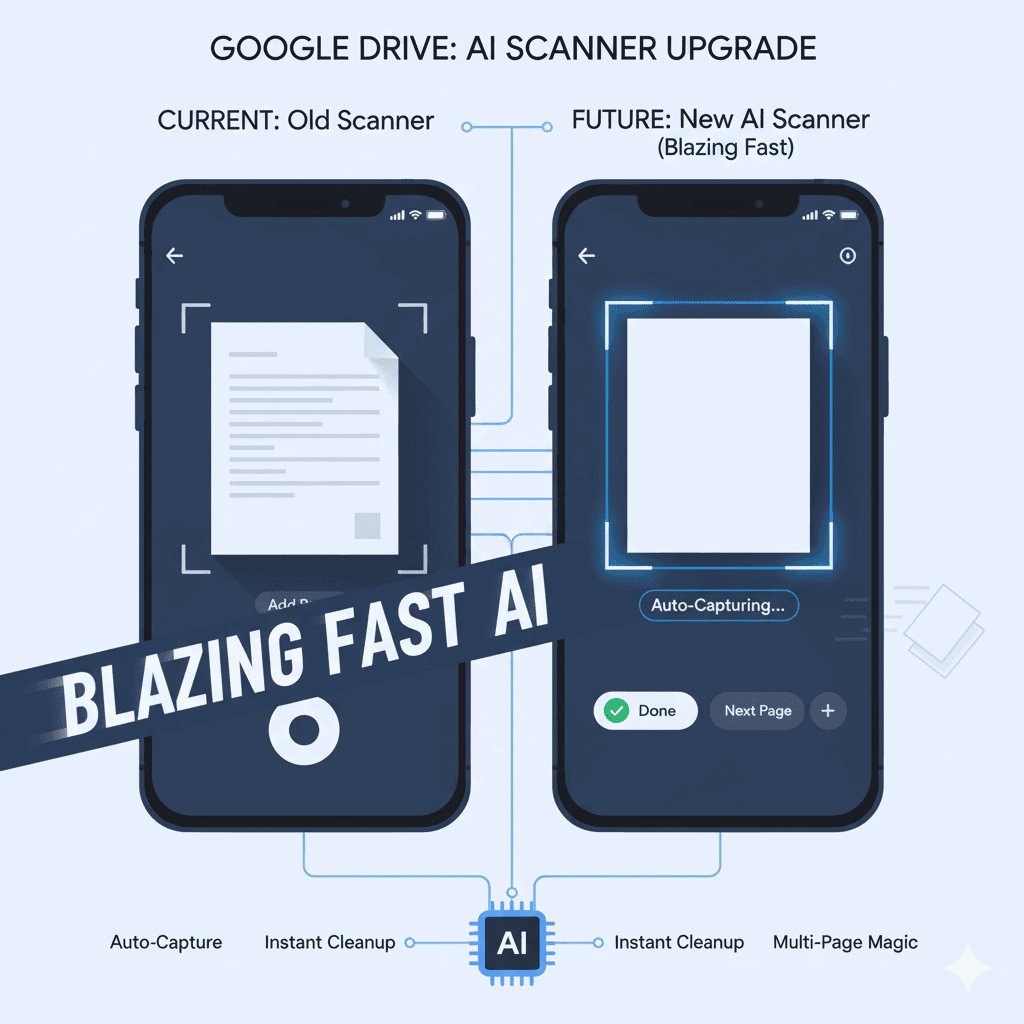
The new Drive scanner is also an AI-controlled scanner that works practically independently. This eliminates the process of taking additional actions by the users.

Auto-Capture has become the norm: You do not have to push a button on each page. A document is automatically detected using the AI scanner. It captures the photo immediately, and the paper is still.

Blazing Speed: The system is so high-speed that you can turn pages one by one. Each page is scanned very fast. This allows you to scan a several-page document within a few seconds. This process used to take a long time before.

Multi-Page Made Easy: The scanner can now process a lot of pages without difficulties. It opens a new page and immediately adds it to the file. This is extremely quick to make one PDF file.

Smarter Scanning Features

The AI is not only fast. It also improves the appearance of the scanned documents.

Improved Edge Detection: The scanner has a smoother line that defines the document. It properly locates the edges of the paper.

Automatic Cleanup: The AI fixes itself automatically. It eliminates shadows and lightens. This simplifies the text to read. You immediately have a digital picture that is of good quality.

New Look: The scanner application also has a more edgy look. It is based on the new Material 3 Expressive appearance of Google. It has new buttons and a renewed camera view, making it easier to navigate.

These intelligent features will put a minimum of work on you. It provides you with a clear and professional scale, which is not manually edited.

Who receives the New Scanner?

The new AI-enhanced scanner is in its testing phase,se and it was first introduced as a part of Google Workspace Labs, where a small number of users can use it. It will most likely be rolled out in the near future, and both personal and business Google accounts will be upgraded. 

The scanner is built in a mobile-first manner and is being added to the Google Drive application to allow scanning on the go. This update shows that Google is actively striving to incorporate the use of AI to enhance everyday, ordinary chores, and in the future, everyone will have access to an ultra-fast and efficient document scanner.

Conclusion 

The AI-based document scanner proposed by Google is not merely a speed-optimization tool but a transformation in the way in which even commonplace tools are getting smarter and more user-friendly.

The new scanner leaves the time-consuming task of scanning a thing of the past by integrating auto-capture with multi-page processing at a blisteringly fast speed, as well as an in-built image clean-up. 

Through this upgrade, Google Drive establishes a new standard in mobile document management, and scanning has become faster, simpler, and smarter than ever.

FAQs 

How does the new scanner better the old?

The primary one is a tremendous acceleration of scanning speed, which is the result of AI automation.

Do I have to press a button and scan?

No, the new AI scanner makes the copy automatically. All you do is hold your phone still.

Does it scan one or more pages in a short period of time?

You can turn pages very quickly. Each page will automatically be added to the scanner in a single file.

Is the new scanner now available to all?

No, it is initially undergoing testing with a small group of users in Google Workspace Labs.

Will the scans be improved as compared to the past?

Yes, it is automatically quality-enhancing by the AI. It eliminates shadows and accentuates the image.

What happens to the document image by the AI?

It automatically corrects the white balance, enhances contrast, and eliminates any shadows present.

Would I require a new application of this feature?

No, the new scanner is a revision to the existing Google Drive mobile application.

Does the scanner have a new visual style?

Yes, it has a cleaner appearance. It embraces the new Material Expressive of Google.

Does it support both Android and iPhone?

It is normally launched on Android. Later, it should be made available to iOS users.

What is the advantage of this speed?

It saves users a lot of time. It takes only a matter of seconds rather than minutes to scan big documents.


Share197Tweet123
Bena Ilyas

Bena Ilyas

Bena Ilyas is a rising star in the world of tech writing, bringing a fresh perspective and innovative insights to every article. With a background in digital marketing and a passion for exploring the intersection of technology and human behavior, Bena's writing offers readers a unique blend of technical expertise and relatable storytelling

  • Trending
  • Comments
  • Latest
Fuchsia Version 16 Rolling Out to Nest Hub Devices

Fuchsia Version 16 Rolling Out to Nest Hub Devices

August 28, 2025
What June 2025 Brings to Google System Update

Android’s March 2025 Google System Updates

August 13, 2025
What’s fresh in Android’s April 2025 Google System Update

Android’s March 2025 Google System Updates: What’s New

August 9, 2025
Material 3 Expressive Redesign

Google Brings Material 3 Expressive Redesign to Wear OS Apps

5
Samsung's Now Bar Might Actually Be Useful in One UI 8

Dеlеtе Unwantеd Googlе Account on Your Mobilе

2
Google Pixel

The­ Cutting-Edge Feature­s Introduced In The Latest Google­ Pixel

1
Material 3 Expressive Redesign

Google Brings Material 3 Expressive Redesign to Wear OS Apps

October 4, 2025
Digital Gift Cards

Google Play Store Adds Digital Gift Cards for Instant Sharing

October 4, 2025
Google Wallet Material 3 redesign

Google Wallet expands Material 3 redesign rollout

October 3, 2025
FuchsiaWire

Copyright © 2015 FuchsiaWire.

FuchsiaWire

  • About
  • Privacy & Policy
  • Contact
  • Privacy Policy
  • Disclaimer

Follow Us

No Result
View All Result
  • Fuchsia OS
  • Android
    • Samsung
    • Android 13
    • Android 14
    • Auto
    • OnePlus
    • Oppo
    • Wear OS
  • Nest
    • Nest Audio
    • Nest Cam
    • Nest Doorbell
    • Nest Hub
    • Nest Hub Max
    • Nest Mini
    • Nest Thermostats
  • Chrome
    • Google Chrome
    • ChromeOS
  • TV
    • Google TV
    • Android TV
    • Chromecast
  • Workspace
    • Gmail
    • Google Calender
    • Google Chat
    • Google Docs
    • Google Drive
    • Google Keep
    • Google Meet
  • Pixel
    • Pixel 7
    • Pixel 7 Pro
    • Pixel 8 pro
    • Pixel Buds Pro
    • Pixel watch
    • Pixel watch 2
  • YouTube
    • YouTube
    • YouTube Music
    • YouTube TV
  • Reviews
  • Exclusives

Copyright © 2015 FuchsiaWire.